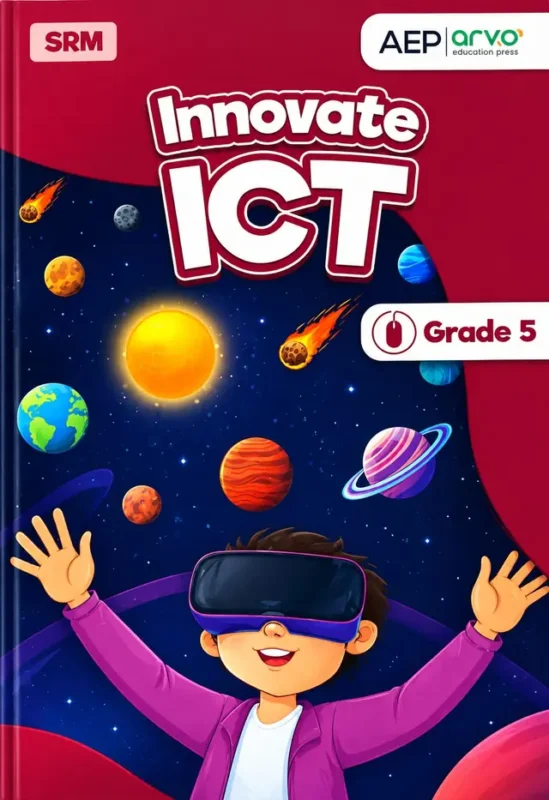
Innovate ICT, Grade 5 is the Class 5 computer studies book of Allied Schools, the school system run as a project of the Punjab Group of Colleges. It is published by AEP (arvo education press) and carries the SRM mark. The cover is a deep-red galaxy scene with planets and comets, and a smiling child in a virtual-reality headset with both arms raised. It is a fair preview: this is a book that sends a ten-year-old into the technologies of today.
If your child is in Class 5 for the 2027-28 session, this is the computer book on their list. What makes this edition stand out is how current it is. Alongside the expected topics of hardware, software and the internet, it includes two units on artificial intelligence and chatbots and responsible research with AI tools, topics that did not appear in primary computer books only a few years ago. That is what ‘latest syllabus’ means in practice: a child learns not only how a computer works, but how to use AI safely and sensibly.
Full table of contents: 8 units, every topic, with what it gives your child
The contents pages list eight units with page ranges (about 144 pages in all). Every entry is given below exactly as printed, followed by a note on why the unit matters.
Unit 01 – ICT Fundamentals: Computer Hardware and Software (pages 01 to 22)
- Understanding Computer Software
- System Software & Application Software
- Small, Medium & Large Devices
- Microcontrollers
- Memory unit & its Types
- Binary Digits
Why it helps: The unit begins with the difference between system software (which runs the computer) and application software (which does your work), then moves from small devices to large ones. Microcontrollers, the tiny computers inside washing machines and toys, are explained, and memory types and binary digits show how a computer stores everything as 0s and 1s. A child who understands this has the vocabulary for every later unit.
Unit 02 – ICT Fundamentals: Computer Networks (pages 23 to 37)
- Computer Networks & their types
- Network Topology
- How the Internet Works
- Different Services of Internet
Why it helps: Children use the internet every day without knowing what it is. This unit explains local and wide networks, how computers are arranged in a network (topology), and what actually happens when a page loads. It also lists the services that run on the internet, such as email and web browsing.
Unit 03 – ICT Fundamentals: Artificial Intelligence and Chatbots (pages 38 to 55)
- Understanding Artificial Intelligence
- Five Key Elements of Artificial Intelligence
- What are Chatbots & How they use AI Ideas
- Chatbot Designing, Troubleshooting & Debugging
- Chatbots in our Daily Life
Why it helps: This is the headline unit of the book. It explains in simple language what AI is, names five key elements of AI, and shows how chatbots use those ideas. Children then design a chatbot and learn to troubleshoot and debug it, which is real computational thinking, and see where chatbots already appear in their daily lives.
Unit 04 – E-safety: Be a Cyber Smart Citizen (pages 56 to 70)
- Internet Threats you should know
- Be Smart, Be Safe
- Passwords and Protections
- Digital Footprint & Citizenship
- When and How to Ask for Help
Why it helps: Ten-year-olds are online more than their parents realise. This unit teaches what threats exist, how to build strong passwords, what a digital footprint is, and, perhaps most importantly, when and how to ask a trusted adult for help. It gives parents and children a shared vocabulary for talking about online safety.
Unit 05 – Digital Skills: Responsible Research with AI and more (pages 71 to 81)
- Your Research Toolkit
- Why to use different Tools
- Comparing Information
- Smart Searching
- Respectful Research
- Summarizing Key Information
- Evaluating Sources
- Putting it All Together
Why it helps: Homework research is where AI tools are most tempting and most misused. This unit teaches children to use several tools, to compare what they find, to search smartly, to respect other people’s work, to summarise in their own words and to judge whether a source can be trusted. These skills protect a student from copying and from wrong information.
Unit 06 – Digital Skills: MS Excel (pages 82 to 100)
- Microsoft Excel and its main Parts
- Creating and Saving your Work
- Formatting your Worksheet
- Formulas and Functions
- Charts and their Creation
Why it helps: Excel is the most useful office program after Word. Children learn the parts of the screen, how to save, how to format a worksheet, how to write formulas and functions, and how to turn data into a chart. It helps directly with maths and science projects.
Unit 07 – Programming: Scratch (pages 101 to 125)
- Understanding Loops and conditions
- Using Loops and conditions
- Glide and Greet Project
- Working with Lists
- Quiz Game Project
- Making your own Blocks
- Combining Everything in a … (the end of this line is cut off in our contents photo)
Why it helps: Scratch turns programming into building with blocks. After the ideas of loops and conditions, children make a Glide and Greet project, work with lists, build a quiz game and create their own blocks, then combine everything in a final project. The projects give children something to show their family.
Unit 08 – Design Thinking & Entrepreneurship: Design, Innovate and Promote (pages 126 to 144)
- Five stages of Design Thinking
- What is Prototype & Why do we Create it?
- Types of Prototype, Refining & Improving Prototype
- Pitching & some Tips of Great Pitching
- Entrepreneurship and Innovation
- Marketing & Promotion
Why it helps: The last unit takes a child from an idea to a pitch. They learn five stages of design thinking, build and improve a prototype, practise pitching their idea, and see how entrepreneurs market a product. It prepares students to think like problem solvers, not just users of technology.
Why this book is a good buy for the 2027-28 session
Three things make this edition valuable. First, it is current: it teaches AI, chatbots and responsible research with AI at primary level. Second, it is practical: Excel and Scratch units are built around projects the child finishes and can show. Third, it takes safety seriously, with a whole unit on being a cyber smart citizen. Together they cover what a Class 5 student needs to know about computers today.
Who, when, where and why
Whom: Class 5 students at Allied Schools (about ten years old), and parents who want to follow what their child learns in the computer lab. When: through the school year, roughly one unit every few weeks. Where: in the computer lab and at home, if a computer is available. Why: to build computer literacy, safe habits and early programming skills. Allied Schools is a project of the Punjab Group of Colleges.
Frequently asked questions
Does it teach AI?
Yes. Unit 03 covers artificial intelligence and chatbots, and Unit 05 covers responsible research with AI.
Which software does it use?
MS Excel (Unit 06) and Scratch (Unit 07).
Is it the latest edition?
The cover shows AEP | arvo education press, SRM, Grade 5; message us if your school asks for a specific printing.
Order Innovate ICT Grade 5 online with Cash on Delivery across Pakistan, or visit our shop in Lahore. Message us the class and campus on WhatsApp and we will confirm the edition before we dispatch.