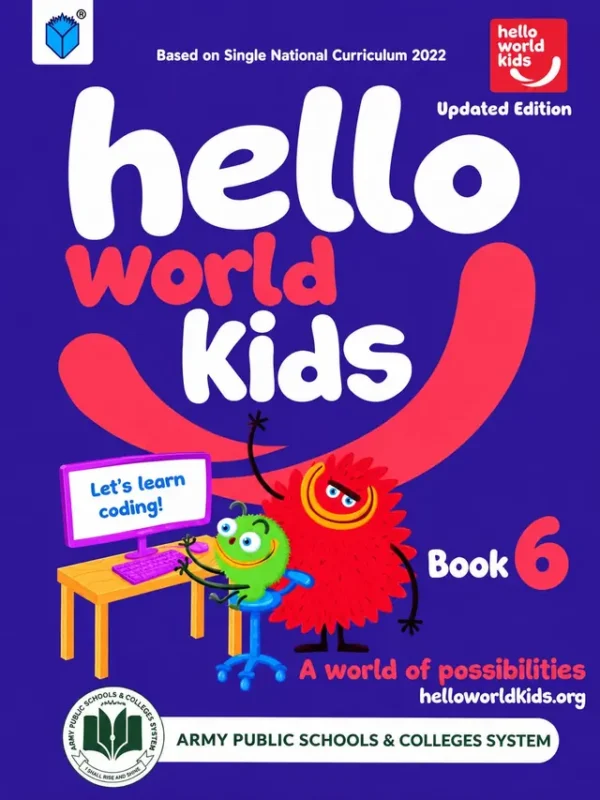
Hello World Kids, Book 6 (Updated Edition) is the Class 6 computer book of the Army Public Schools & Colleges System. The cover (purple, with the series’ red and green characters at a computer) reads ‘Based on Single National Curriculum 2022’, ‘Updated Edition’, ‘Let’s learn coding!’ and ‘A world of possibilities’. From Class 6 the book follows a six-unit structure that repeats in Books 7 and 8: ICT fundamentals, digital skills, algorithmic thinking, programming, digital citizenship and entrepreneurship in the digital age. Available to order now for the 2027-28 session.
Class 6 is the first year of secondary computer studies, and the book is a big step up from primary. It defines the computer properly, teaches Windows and file management, introduces algorithms and Scratch programming, and spends a full unit on digital citizenship: ethics, privacy, security, health and ICT lab rules.
Full table of contents: Units 1 to 6, every topic and page
The contents are printed as six units with topics and starting pages. Every entry is given exactly as printed, with a note on what each unit gives the student.
Unit 1: ICT Fundamentals (page 5)
- Computer Definition (p. 8)
- ICT Devices (p. 9)
- ICT Applications (p. 11)
- Advantages and Disadvantages of ICT Devices (p. 14)
- Data Vs. Information (p. 15)
- Hardware and Software (p. 16)
- Hardware Components of the Computer (p. 17)
- Processing Devices (p. 23)
- Storage Devices (p. 25)
Why it helps: The foundation unit. It explains what a computer is, the difference between data and information, hardware and software, and what the processor and storage devices do. A student who understands these terms will find the rest of the book, and the rest of IT, far easier.
Unit 2: Digital Skills (page 31)
- Operating Systems (p. 34)
- Functions of the Operating System (p. 34)
- Types of Operating Systems (p. 35)
- Stepping into Windows (p. 37)
- Log On (p. 39)
- Desktop (p. 40)
- Managing Files and Folders (p. 41)
- Create a New File, Folder, and Shortcut (p. 42)
- Working with Paint 3D (p. 47)
- Navigate the Internet to Conduct a Seach Query (as printed) (p. 53)
Why it helps: This is the hands-on unit. Students learn what an operating system does, how to log on, use the desktop and manage files and folders, and then practise creativity in Paint 3D and research skills by searching the internet. Good file habits learned here save a great deal of lost homework later.
Unit 3: Algorithmic Thinking and Problem Solving (page 61)
- What is a Problem? (p. 64)
- Problem Parts (p. 64)
- Simple Vs. Complex Problems (p. 66)
- What is an Algorithm? (p. 66)
Why it helps: Before writing a program you must be able to break a problem down. This short unit teaches the habit of splitting a problem into parts and describing the solution step by step, a skill that is useful far beyond computers.
Unit 4: Programming (page 75)
- Programming Languages (p. 78)
- What is a Program? (p. 79)
- Importance of Programming (p. 79)
- What is Scratch? (p. 80)
- Coding Environment (p. 80)
- Programming Constructs (p. 82)
- Debugging a Computer Program (p. 84)
Why it helps: Students meet programming languages, then learn Scratch, the visual block-based language. The unit teaches the core ideas (sequence, repetition, decision) and ends with debugging, the skill of finding and fixing mistakes, which is half of programming.
Unit 5: Digital Citizenship (page 89)
- ICT Ethics (p. 92)
- Intellectual Property Rights (p. 93)
- Steps to Secure Information Privacy and Confidentiality (p. 94)
- Possible Dangers of the Internet and Related Security (p. 95)
- Health-Related Issues of Using Computer Devices (p. 97)
- Computer Ergonomics (p. 97)
- Behavioural Problems (p. 99)
- Obesity Issues (p. 100)
- Sleeping Disorders (p. 100)
- ICT Lab Rules (p. 101)
Why it helps: This unit protects the student. It covers ethical behaviour, copyright, privacy, online dangers and also the effects on health of too much screen time: posture, weight and sleep. Parents will value the practical lab rules and ergonomics advice.
Unit 6: Entrepreneurship in the Digital Age (page 105)
- Entrepreneurship Definition (p. 108)
- Types of Entrepreneurs (p. 109)
- Examples of Entrepreneurs (p. 110)
- Traditional Vs. Digital Entrepreneurship (p. 111)
- Entrepreneurship Process (p. 112)
Why it helps: The final unit shows students that technology creates opportunities. They learn what an entrepreneur is, meet examples, and compare traditional and digital business, a useful idea in a country with a growing freelance and start-up scene.
Who, when and where
Whom: Class 6 students at Army Public Schools (about eleven years old). When: in the weekly computer period through the year. Where: in the school computer lab, with the book open beside the keyboard; the theory units (1, 3 and 5) are also good for reading at home. How: read a topic, try it on the computer, and write a sentence in your own words.
- What: Hello World Kids Book 6, Updated Edition, based on the Single National Curriculum 2022.
- Whom: Class 6 students.
- Why: to teach computer literacy, programming and responsible digital behaviour.
- Where: Army Public Schools & Colleges.
Frequently asked questions
Does it teach Scratch?
Yes. Unit 4 introduces Scratch and programming constructs.
Is it an updated edition?
Yes. The cover says ‘Updated Edition’ and ‘Based on Single National Curriculum 2022’.
Does it cover internet safety?
Yes. Unit 5, Digital Citizenship, covers privacy, security, internet dangers and ICT lab rules.
You can order Hello World Kids Book 6 online today. We ship across Pakistan on Cash on Delivery, and families in Lahore can also pick it up from our shop. For overseas delivery (Gulf countries), message us on WhatsApp.