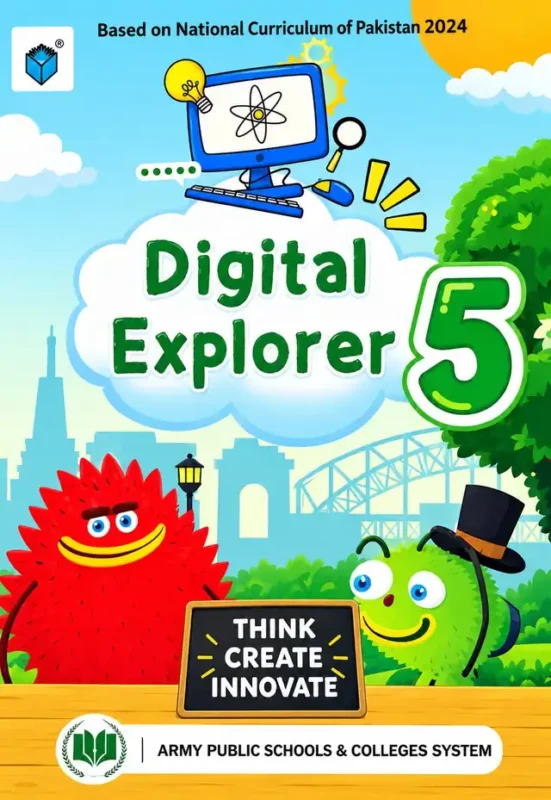
Digital Explorer 5 is the Class 5 computer book for Army Public Schools (APSACS), available to order now for the 2027-28 session. The cover is a cheerful cartoon park under a blue sky: a computer with an atom and a light bulb on its screen floats on a cloud above the title, two furry monster characters (one red, one green in a top hat) stand either side of a chalkboard that reads THINK CREATE INNOVATE, and a line at the top says the book is based on the National Curriculum of Pakistan 2024. The words Army Public Schools & Colleges System are printed along the bottom.
This is not a “how to switch on a computer” book. By Class 5 the course has moved on to the things children will actually meet in Class 6 and beyond: how computers talk to each other, how to turn numbers into charts, how to write real Python code, how artificial intelligence learns, and how to behave safely and respectfully online. The contents page shows five chapters across more than 100 pages. Every chapter opens with its learning outcomes and closes with a chapter exercise, and most add a quick revision of earlier work, a list of terms to know and a short story-style introduction.
Full table of contents: all 5 chapters, every lesson and page
The index is printed over two pages. Every chapter opens with its Learning Outcomes and ends with a Chapter Exercise. Chapters 1 and 2 add a Quick Revision, chapters 3 and 4 add both Terms to Know and a Quick Revision, and chapter 5 adds Terms to Know. Page numbers are as printed.
Chapter 1: Networks: Let Us Get Connected (p. 7)
- Learning Outcomes (p. 8)
- Quick Revision (p. 8)
- Introduction: Greeno Creates His Own Network (p. 9)
- What Is a Network? (p. 10)
- Types of Networks: LAN and WAN (p. 11)
- The Internet: The Biggest Network (p. 12)
- Benefits of Networking (p. 14)
- Chapter Exercise (p. 15)
Why it helps: The chapter starts with a short story (Greeno builds his own network) so a ten-year-old meets the idea before the vocabulary. It then explains, in order, what a network is, the difference between a small local network (LAN) and a wide one (WAN), and why the internet is simply the biggest network of all. Children who understand this can make sense of school computer labs, Wi-Fi and file sharing, and they arrive in Class 6 already knowing the words their teacher will use.
Chapter 2: Turning Data Into Information (p. 17)
- Learning Outcomes (p. 18)
- Quick Revision (p. 18)
- Back to Excel (p. 20)
- Turning Data Into Information (p. 23)
- Charts in Excel (p. 28)
- Search Engines (p. 31)
- Doing Online Research (p. 33)
- Chapter Exercise (p. 34)
- Favorite Sports Survey Project (p. 36)
Why it helps: “Back to Excel” tells you the spreadsheet skills from earlier classes are revisited, not assumed. The core idea is that a list of numbers becomes useful only when you organise it, so students learn to build charts in Excel and then to find facts with a search engine and do simple online research. The chapter ends with a hands-on Favorite Sports Survey Project, which gives a child a real reason to collect answers from classmates, type them in and show the result as a chart.
Chapter 3: Coding Adventures with Python (p. 37)
- Learning Outcomes (p. 38)
- Terms to Know (p. 38)
- Introduction: Back to Python (p. 39)
- Quick Revision (p. 40)
- Algorithmic Thinking (p. 43)
- Applying Algorithmic Thinking (p. 45)
- Arithmetic and Comparison Operators in Python (p. 47)
- Lists in Python (p. 50)
- Shopping Basket Project (p. 52)
- Decision Making in Python (p. 53)
- Repetition and the For Loop (p. 56)
- Debugging: Finding and Fixing Mistakes (p. 58)
- Chapter Exercise (p. 60)
- My Favorites Project (Python) (p. 64)
Why it helps: This is the longest chapter, about 28 pages, and the heart of the book. It first teaches algorithmic thinking (planning the steps before typing anything), then the Python basics: arithmetic and comparison operators, lists, decisions (if this, then that) and repetition with the for loop. Two small projects, a Shopping Basket and My Favorites, put those pieces together. The lesson on debugging matters most: children learn that a mistake in code is something to find and fix, not something to be upset about. That habit helps in maths and science too.
Chapter 4: Know How Machines Learn (p. 65)
- Learning Outcomes (p. 66)
- Terms to Know (p. 66)
- Quick Revision (p. 67)
- Introduction: Spam or Not? How Did the Email Know? (p. 69)
- Artificial Intelligence (p. 70)
- Introduction to Machine Learning (ML) (p. 72)
- How Machine Learning (ML) Works? (p. 72)
- Machine Learning (ML) Types (p. 75)
- Good and Challenging Impacts of AI on Humans (p. 78)
- Thinking Like an AI User (p. 81)
- Chapter Exercise (p. 84)
Why it helps: Children already use technology that learns, and this chapter starts from something familiar: how does an email program know a message is spam? From there the book explains artificial intelligence, machine learning, how it works and its main types. The last two lessons are the important ones for parents: one looks at the good and the difficult effects of AI on people, the other at “Thinking Like an AI User”, meaning how to use these tools sensibly instead of blindly. A Class 5 student who finishes this chapter can explain AI in their own words, which is a strong start in a subject that will only grow.
Chapter 5: From Digital Citizenship to Cyber Safety (p. 89)
- Learning Outcomes (p. 90)
- Terms to Know (p. 90)
- Introduction: Reddo’s Online Dilemma (p. 91)
- What Does It Mean to Be a Digital Citizen? (p. 92)
- Respecting Creators: Copyright and Fair Use (p. 94)
- Your Digital Footprint: The Trail That Follows You (p. 97)
- Cyberbullying: Recognition, Response and Prevention (p. 100)
- Chapter Exercise (p. 106)
Why it helps: Online safety is the topic parents worry about most, so this chapter deserves a slow read. It opens with Reddo’s online dilemma, then explains what a digital citizen is, why we respect other people’s work (copyright and fair use), how everything we post leaves a digital footprint, and how to recognise, respond to and prevent cyberbullying. Having a printed chapter to read together gives you the words to talk about screen time, sharing photos and unkind messages before a problem happens.
What your child gains from this book
- A clear picture of how networks and the internet work, and the words to describe them.
- Spreadsheet skills: entering data, building charts and presenting a survey.
- First real programming in Python: planning with algorithms, using lists, decisions and loops, and fixing bugs.
- A sensible, first understanding of AI and machine learning, and how to use AI tools thoughtfully.
- Safe, respectful online behaviour: copyright, digital footprint and cyberbullying.
Who, what, when, where and how
Whom: Class 5 students of Army Public Schools & Colleges System (about ten years old). What: the printed Class 5 computer textbook, Digital Explorer 5. When: order before the 2027-28 session starts, or in the first weeks of term, so the book is ready for the first lab period. Where: at school in the computer lab and at home for revision, exercises and the two projects. How: let your child read the story introduction first, do the Quick Revision, then work through the lessons with the computer in front of them. Ask them to explain each chapter back to you in two sentences; if they can, they have understood it.
Frequently asked questions
Is this a new book?
It carries the line “Based on National Curriculum of Pakistan 2024” on the cover, and its contents are built around Python, machine learning and cyber safety.
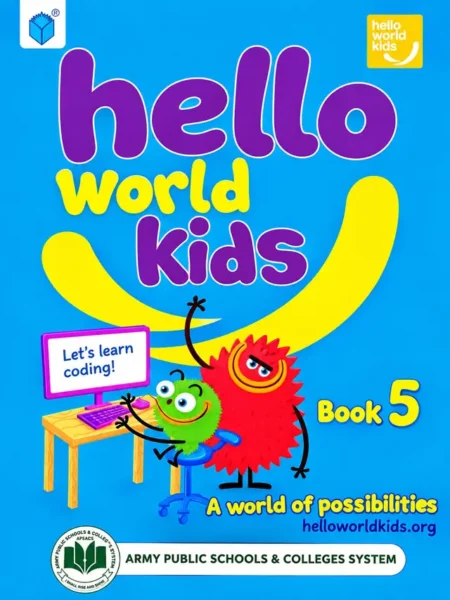
Our child’s Class 5 list may mention Hello World Kids Book 5. Which one do we buy?
Both computer books are listed on our site for Army Public School Class 5. Schools can change a computer book between sessions, so send your campus and class on WhatsApp and we will confirm the right one before we dispatch.
Does it need a computer at home?
Most of the lessons are designed for the school lab, but Excel and Python practice at home helps. Ask your child’s teacher which software the school uses.
Order Digital Explorer 5 online with Cash on Delivery across Pakistan, or collect it from our Lahore shop. Message us the class and campus on WhatsApp and we will confirm the edition before we dispatch.